Invoice form with lines, VAT and a PDF
This invoice form asks for who you are billing, the invoice number and dates, and the lines you are charging for. It adds up the lines, applies an optional discount and your VAT rate, and shows the total due.
Who it is for
- Self-employed people and one-person businesses who invoice a few clients a month
- Small teams that want every invoice to look the same
- Part-time sellers who do not want to maintain an invoice template in a word processor
When to use it
Use it at the end of a job or at the end of the month. The invoice number, issue date and due date are questions, so you stay in control of numbering. Lines can be added as needed, each with a description, quantity and unit price.
What the form asks
Billed to
- Client name · requiredShort text
- Client emailEmail
- Billing address · requiredAddress
Invoice
- Invoice number · requiredShort text
- Issue date · requiredDate
- Due dateDate
Lines
- Lines · requiredLine items
Totals
- SubtotalCalculation
- DiscountAmount
- VAT rate (%) · requiredNumber
- VATCalculation
- Total dueCalculation
- Payment detailsLong text
Every question can be changed, removed or reordered before you publish.
The PDF your respondents receive
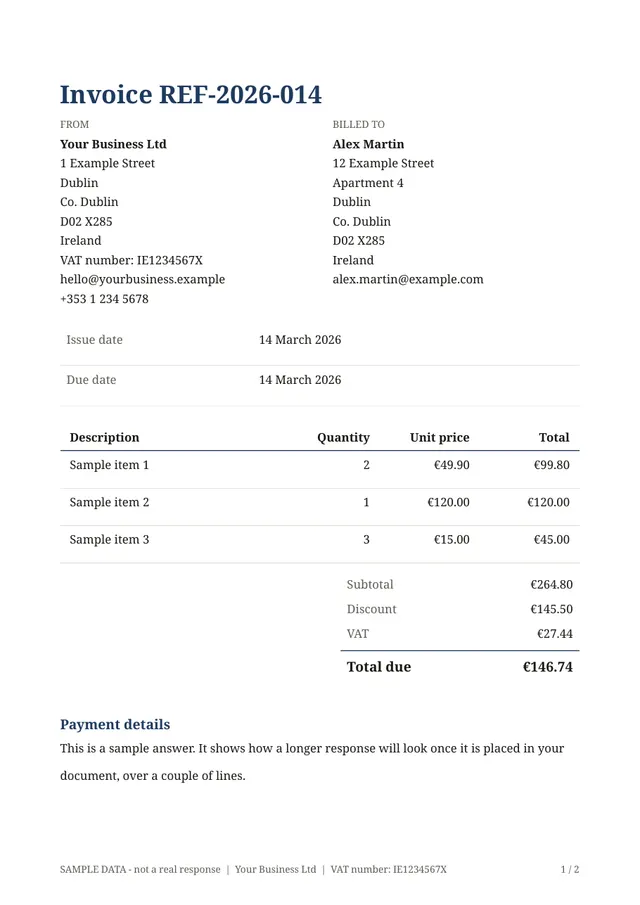
The PDF has a header with your business details, the billed-to block, a table of lines, the totals with VAT and the amount due, and a payment note. Your logo and accent colour carry over to every invoice.
Questions people ask
- Does it keep a record of my invoice numbers?
- No. You type the invoice number, and each response is stored so you can find the PDF again, but Fillfold does not number invoices for you or replace your bookkeeping.
- Can my client fill it in instead of me?
- You decide who receives the link. Most people fill it in themselves, but you could also use it with a bookkeeper or an assistant.
- Does it take payments?
- No. It produces the invoice document only. Online payments are not part of Fillfold today.
Start from this template
Create an account, adapt the questions and the document to your business, then share the link. Your respondents get their PDF the moment they finish.