Expense claim form with totals, receipts and a PDF
An expense claim goes wrong when a receipt is missing or the sum is off by a few euros. This form asks for the period covered, then one line per expense, and it adds up the total claimed as lines are entered. Receipts are attached as photos, and the claim ends with a declaration and a signature.
Who it is for
- Employees and contractors who pay for work costs out of pocket
- Small businesses and clubs that reimburse a handful of people each month
- Managers who want every claim in the same shape before approving it
- Volunteers who are repaid for travel or supplies
When to use it
Use it at the end of a trip, a project or a month. The person claiming enters the dates, adds one line for each expense with its amount, takes a photo of each receipt and signs the declaration. Whoever approves the claim gets a single document instead of a thread of emails with loose pictures.
What the form asks
Who is claiming?
- Full name · requiredShort text
- Email address · requiredEmail
- Phone numberPhone
- From · requiredDate
- To · requiredDate
Expenses
- Expenses · requiredLine items
- Total claimedCalculation
- Receipts (photos)Image upload
- Declaration · requiredConsent box
- Signature · requiredSignature
Every question can be changed, removed or reordered before you publish.
The PDF your respondents receive
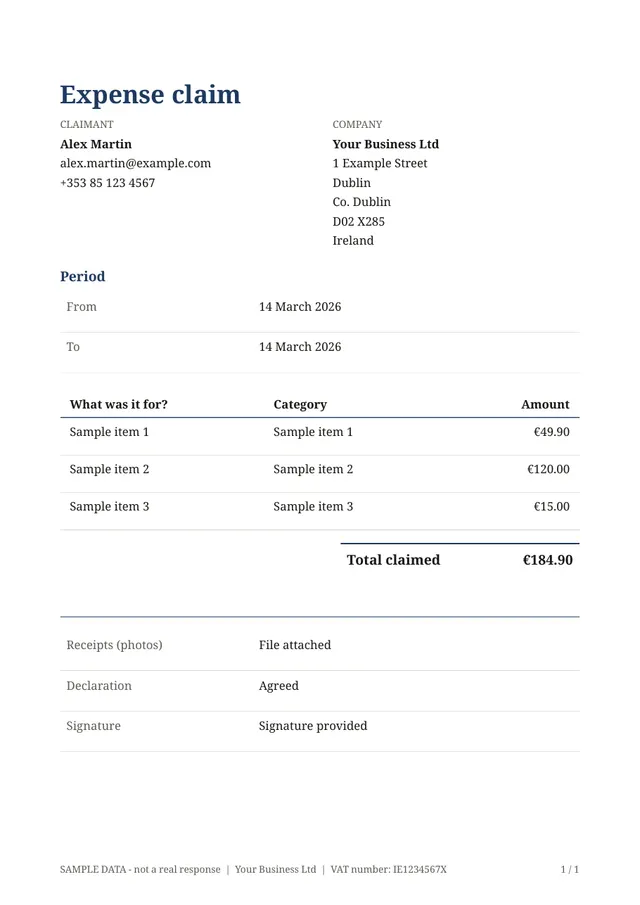
The PDF lists the claimant's details, the period, a table of expenses with the total claimed, the receipts attached as images, the declaration and the signature. It is easy to forward to whoever pays, or to file with your accounts.
Questions people ask
- Is the total worked out automatically?
- Yes. The total claimed is calculated from the amounts on the expense lines, so nobody needs a calculator and the figure on the PDF always matches the lines above it.
- Can people attach several receipts?
- Yes, receipts are attached as photos. Phone pictures work, and the images are included in the PDF.
- Does it approve or pay the claim?
- No. It collects the claim and produces the document. Approval and payment stay with you, in whatever way your organisation already does them.
Start from this template
Create an account, adapt the questions and the document to your business, then share the link. Your respondents get their PDF the moment they finish.