Quote form with automatic totals and a PDF
A quote is often the first document a client sees from you. This form collects the client, the lines of work with quantities and unit prices, and your VAT rate, then works out the subtotal, the VAT and the total to pay for you.
Who it is for
- Freelancers and consultants who quote per project or per day
- Tradespeople and small contractors who price jobs on site
- Small agencies and studios sending several quotes a week
- Anyone who still builds quotes in a spreadsheet and copies them into a document
When to use it
Use it whenever a client asks "how much?" and you want an answer that looks professional the same day. You can fill it in yourself after a call, or let a colleague do it. Each line has a description, a quantity and a unit price, and the line total is calculated, so there is nothing to add up by hand and no formula to break.
What the form asks
Client
- Client name · requiredShort text
- Client emailEmail
- Client addressAddress
Quote
- Quote referenceShort text
- Valid untilDate
What is included
- Lines · requiredLine items
Totals
- SubtotalCalculation
- VAT rate (%) · requiredNumber
- VATCalculation
- Total to payCalculation
- Notes and termsLong text
Every question can be changed, removed or reordered before you publish.
The PDF your respondents receive
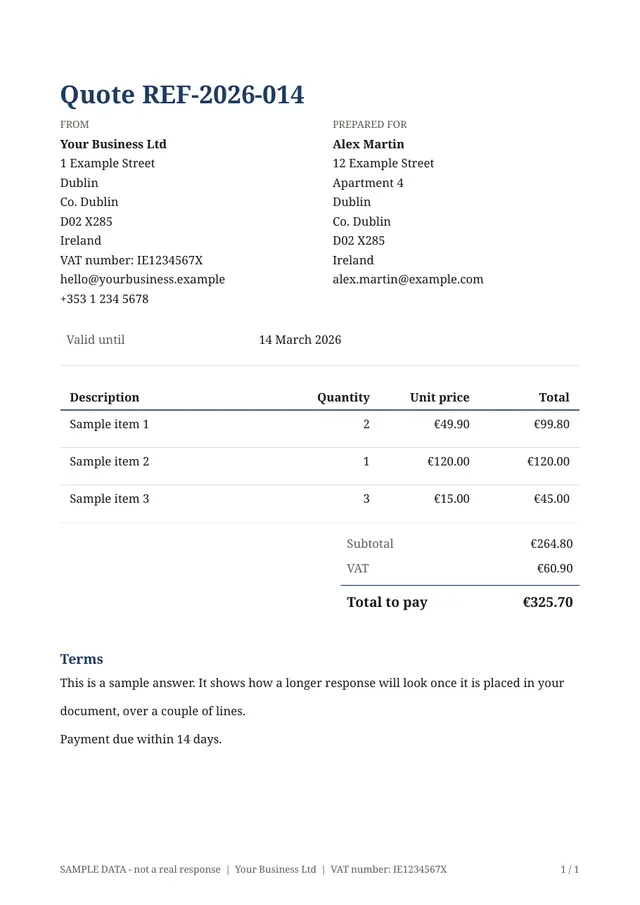
The PDF shows your details and the client's side by side, a table of the lines with their totals, then the subtotal, VAT and total to pay, followed by your notes and terms. Your logo, colours and business details can be added once in the document editor and reused on every quote.
Questions people ask
- Are the totals calculated automatically?
- Yes. Each line total is quantity times unit price, and the subtotal, VAT and total are worked out from them. The VAT rate is a question, so you can use the rate that applies to the job.
- Can I change the questions or the layout of the PDF?
- Yes. The form and the document are both editable: add or remove questions, change the wording, add your logo and choose a look. Changes go live when you publish.
- Is this an accounting tool?
- No. Amounts are calculated and rounded to two decimals, which suits a quote, but this is not certified accounting software. Keep your accounting in your usual tool.
Start from this template
Create an account, adapt the questions and the document to your business, then share the link. Your respondents get their PDF the moment they finish.