Testimonial request form with permission to publish
A testimonial is only useful if you may publish it. This form asks the client for their name, their role and company, a rating, and a few sentences about what it was like to work with you. It then asks plainly whether you may use their words and name on your website, and offers a signature.
Who it is for
- Freelancers, coaches and agencies collecting proof of good work
- Small businesses that want reviews for their website or brochure
- Anyone who has been asked "can I use that nice message you sent?" and wants a cleaner process
When to use it
Send it when the client is at their happiest: after a successful delivery or a positive message. The conversational layout asks one thing at a time, so it feels lighter than writing a review from a blank page, and the permission question is explicit rather than assumed.
What the form asks
Questions
- Your name · requiredShort text
- Your role and companyShort text
- How would you rate the work? · requiredRating
- In a few sentences, what was it like to work with us? · requiredLong text
- May we publish your words and name on our website? · requiredYes / No
- SignatureSignature
Every question can be changed, removed or reordered before you publish.
The PDF your respondents receive
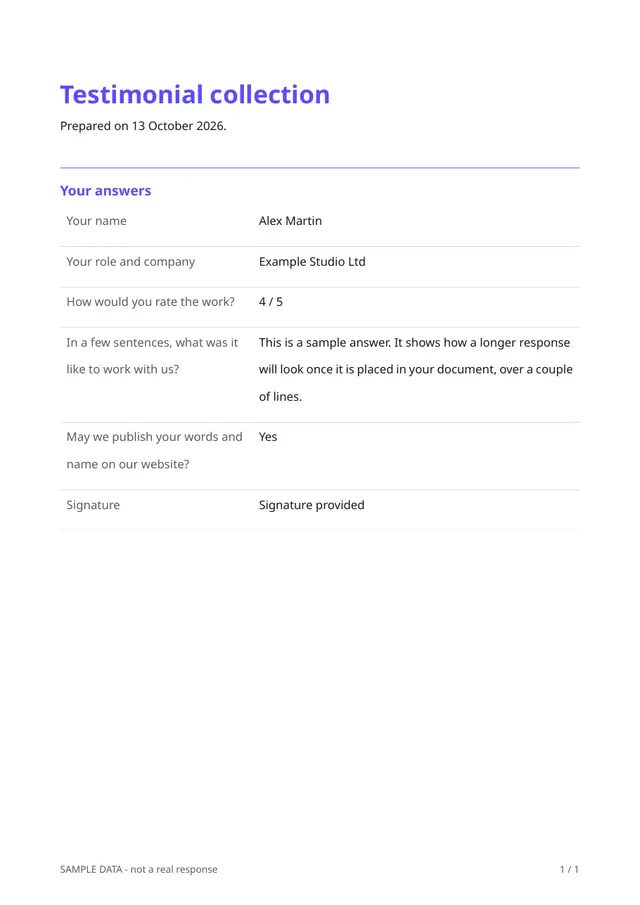
The PDF records the testimonial, the rating, the person's role, their answer on permission and their signature with the date. It is a useful record of what you were allowed to publish and when.
Questions people ask
- Does the signature make the permission legally binding?
- It records the person's answer and a drawn signature with the date, which is a helpful record. Rules on endorsements differ by country, so check with a professional if you are unsure.
- Can the client decline publication?
- Yes. The permission is a yes or no question. If they answer no, you can still read their feedback privately.
- Can I use their words word for word?
- That is what the permission covers. Editing a testimonial heavily changes its meaning, so it is good practice to show them any changes first.
Start from this template
Create an account, adapt the questions and the document to your business, then share the link. Your respondents get their PDF the moment they finish.