General consent form with your own wording and a signature
Sometimes you simply need someone's written agreement. This form shows a statement that you write yourself, then asks for their name, email and the date, a yes or no to the sentence "I have read the statement above and I consent," and a signature.
Who it is for
- Clubs, schools, studios and small businesses
- Anyone who needs a signed agreement to a specific activity or use of information
- Teams that want a standard consent for every client
When to use it
Replace the paragraph at the top with the exact wording, then share the link or have people complete it on a tablet. Keeping one clear statement per form makes each consent easy to understand and to prove.
What the form asks
Questions
- Full name · requiredShort text
- Email address · requiredEmail
- Date · requiredDate
- I have read the statement above and I consent. · requiredYes / No
- Signature · requiredSignature
Every question can be changed, removed or reordered before you publish.
The PDF your respondents receive
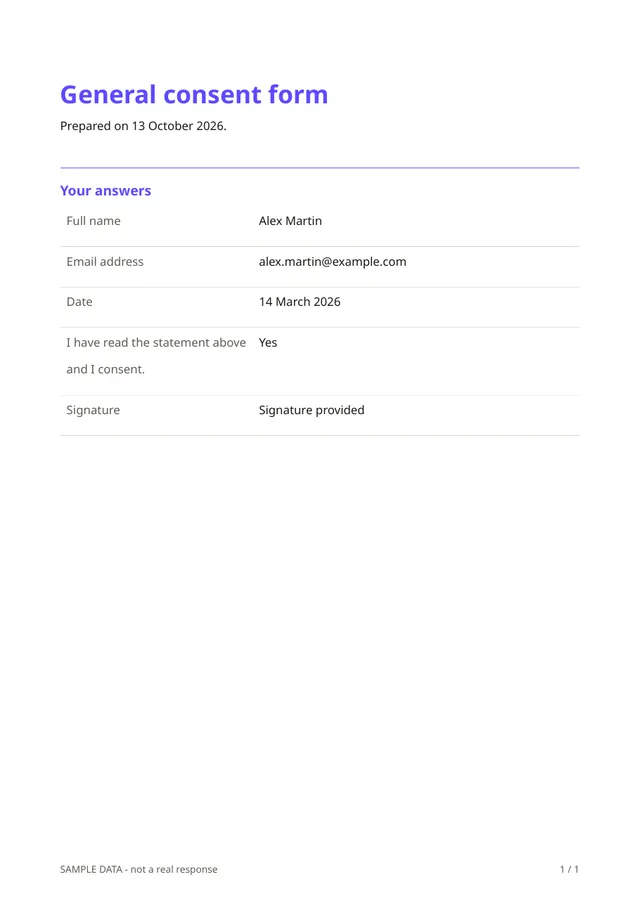
The PDF shows the statement as it was when the person signed, their details, their answer and their signature with the date. Because the form is frozen at publication, later edits do not change old records.
Questions people ask
- Is the result legally binding?
- It records a clear agreement with a drawn signature and a date. Whether it is enough depends on your country and what the consent is for, so check with a professional when it matters.
- Does it replace a data-protection consent?
- It can be used to record one, but data-protection rules are specific. Make sure your wording meets the rules that apply to you.
- Can people withdraw consent?
- The form does not manage withdrawals. You need a way for people to contact you if they change their mind.
Start from this template
Create an account, adapt the questions and the document to your business, then share the link. Your respondents get their PDF the moment they finish.