Parent permission slip for trips and activities
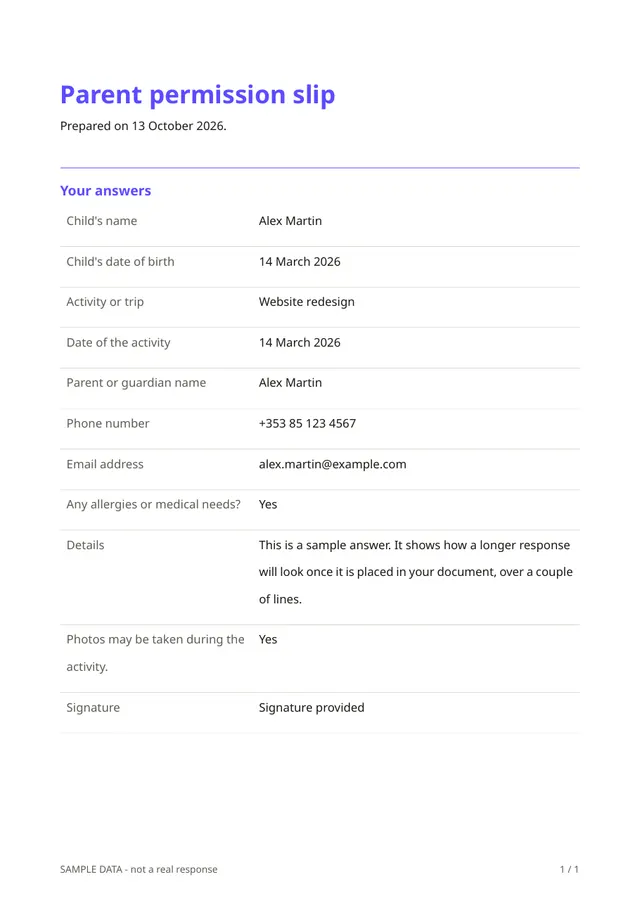
Before a school trip or club activity, you need a parent's clear permission. This form asks for the child's name and date of birth, the activity and its date, the parent or guardian's name, phone and email, whether the child has allergies or medical needs (with details), whether photos may be taken, and a signature.
Who it is for
- Schools, nurseries and after-school clubs
- Sports clubs, scouts and youth groups
- Organisers of camps, outings and workshops for children
When to use it
Send the link to parents a couple of weeks before the activity. Parents can sign on a phone in a minute rather than returning a paper slip, and you receive every answer in the same format, including medical details you need on the day.
What the form asks
Questions
- Child's name · requiredShort text
- Child's date of birth · requiredDate
- Activity or trip · requiredShort text
- Date of the activity · requiredDate
- Parent or guardian name · requiredShort text
- Phone number · requiredPhone
- Email addressEmail
- Any allergies or medical needs? · requiredYes / No
- DetailsLong text
- Photos may be taken during the activity. · requiredYes / No
- Signature · requiredSignature
Every question can be changed, removed or reordered before you publish.
The PDF your respondents receive
Each slip is a signed PDF with the child's details and the permissions, which the organiser can print for the day and a parent can keep. It contains information about a child, so store and share it carefully and delete it when it is no longer needed.
Questions people ask
- Is a signature on screen accepted?
- It records a drawn signature and the date. Schools and insurers may have their own requirements, so check what you need to accept.
- Can I use it for several children?
- Each form covers one child. A parent with two children submits it twice.
- How is children's data protected?
- Responses are stored encrypted on the server and only you can open them. Collect only what you need and delete responses after the activity.
Start from this template
Create an account, adapt the questions and the document to your business, then share the link. Your respondents get their PDF the moment they finish.