Support request form that collects what you need to help
Support slows down when the first message lacks the basics. This form asks for the person's name and email, an order or account reference, the topic, how urgent it is, a description of the problem, what they have already tried, and an optional screenshot or document.
Who it is for
- Small online shops and subscription businesses
- Software and service teams without a full help desk
- Freelancers who support clients after delivery
When to use it
Link it from your help page or your contact page in place of a plain email address. The topic and urgency questions let you sort the incoming requests, and the question about what has already been tried saves you from suggesting the same fixes again.
What the form asks
Questions
- Your name · requiredShort text
- Email address · requiredEmail
- Order or account referenceShort text
- What is it about? · requiredDropdown
- How urgent is it? · requiredMultiple choice
- Describe the problem · requiredLong text
- What have you already tried?Long text
- Screenshot or document (PDF, PNG or JPEG)File upload
Every question can be changed, removed or reordered before you publish.
The PDF your respondents receive
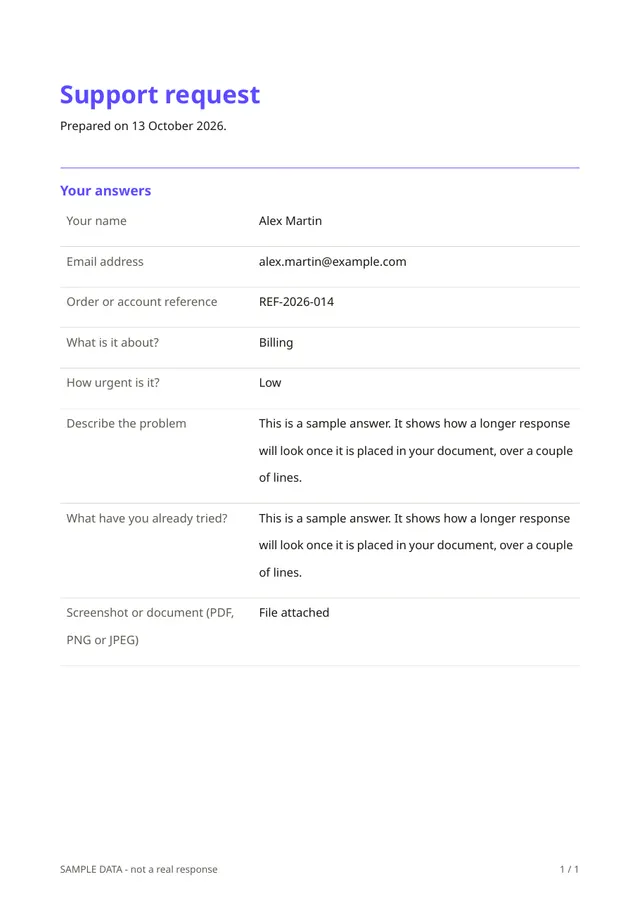
Each request becomes a PDF with every answer in order and the screenshot attached when it is a PNG or JPEG. You can forward it to a colleague or keep it with the customer's file.
Questions people ask
- Is this a ticketing system?
- No. It collects and records requests. You answer by email or in your usual tool, and there is no automatic ticket numbering or status tracking.
- Can customers attach files?
- Yes. They can attach a PDF, PNG or JPEG, up to the size limit shown in the form.
- Can I change the list of topics?
- Yes. Edit the topics and the urgency levels so they match your business.
Start from this template
Create an account, adapt the questions and the document to your business, then share the link. Your respondents get their PDF the moment they finish.