Calculations, line items, VAT and totals
Updated 21 October 2026 · 4 min read
Add a Line items question for the rows, with a column worked out automatically (quantity * unit_price). Then add Calculation questions for the subtotal, the VAT and the total, each with a short formula.
Quotes, invoices and expense claims need sums that are right every time. Fillfold has two tools for this. Line items is a table your client fills in row by row. Calculation is a question nobody types into: it shows a result worked out from earlier answers. The quickest start is the quote with totals template, which already has both.
Adding the lines
- Click Add a question and choose Line items.
- It starts with four columns: Description, Quantity, Unit price and Total. The Total column is already set to Work this column out automatically with the Formula for each line
quantity * unit_price, and Add up this column under the table is ticked. - Pick the Currency (EUR, GBP, CHF or USD) and how many lines your client may add with At least and At most (up to 100).
- Change a column with its title and its Type: Text, Number or Amount of money. Click Add a column for more (up to 6).
Each column has a Key (used in formulas), such as quantity. A column formula can only use the number columns placed before it in the same row.
Adding the subtotal, VAT and total
Each step is a Calculation question placed under the lines. Suppose the line items question has the key lines.
- Add a Calculation named "Subtotal" (key
subtotal) with the Formulasum(lines.line_total). - Add a Number question "VAT rate (%)" (key
vat_rate) so the rate can change, or write the rate straight into the next formula. - Add a Calculation "VAT" (key
vat_amount) withround(subtotal * vat_rate / 100, 2). - Add a Calculation "Total to pay" with
subtotal + vat_amount. - For each one, set Result is to An amount of money and pick the currency.
Under the formula box, "This formula is valid." confirms it reads correctly. Otherwise a plain message says what to fix.
Writing formulas
- Use
+ - * /and brackets. The functions are round, abs, floor, ceil, min, max, sum, avg, count, today and add_months. sum(lines.line_total)adds a column;count(lines)gives the number of lines.- The Names: buttons insert a key for you, and the Quick builder writes a simple formula from two values and an operation, for example the subtotal times a fixed number… such as 0.23.
- Dates count in days:
end_date - start_dateis a number of days, andadd_months(start_date, 2)is a date. Set Result is to A date for a date result.
Good to know
- A formula can only use questions placed above it. Empty answers count as 0.
- Your client sees each result but cannot change it, and the server works it out again when the form is sent.
- To show the lines and totals in the PDF, use the Lines and totals block of the document: see design the PDF.
- Fillfold works out the numbers you set up. It is not certified accounting software: check your rates and wording, and the rules that apply to your invoices.
- Your VAT number and payment details come from your business details.
Totals can also drive conditions, for example a note that appears only above a certain amount.
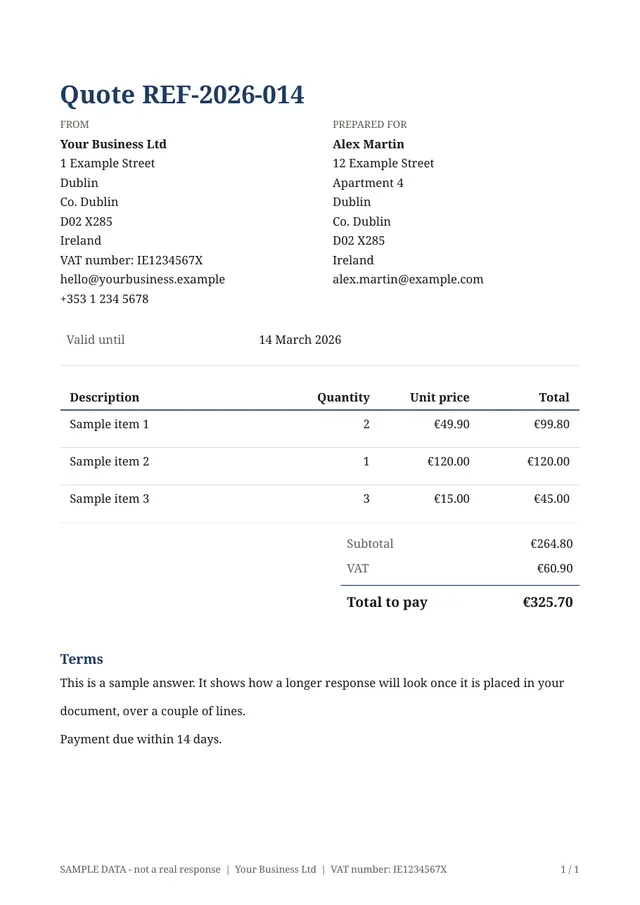
The template for this
Quote with totals
Ready to use: change the questions, add your logo and share the link.
Related templates
- Invoice with totalsAn invoice with lines, an optional discount, VAT and the total due.
- Expense claim with totalsA list of expenses with receipts; the total claimed is added up for you.
Send your first document today.
Pick a template, add your logo, share the link. Free during early access.