Job sheet template: what to include, and how to get it signed on site
Updated 21 October 2026 · 6 min read
A job sheet records one job: who it was for, where, what was done, the time and materials used, anything left to do, and the client's signature. You can keep it on paper, in Word or Excel, or fill it in on a phone so the client signs on the spot and gets a PDF straight away.
A job sheet (also called a job card, work sheet or service report) is the record of one job. It says who the work was for, where it took place, what was done, how long it took, what materials were used and whether the client was happy. Plumbers, electricians, heating engineers, cleaners, installers and maintenance teams use them every day. This guide covers what a job sheet template should contain, and two ways to use one.
A good job sheet protects both sides. The client sees exactly what they are paying for. You have a dated record if a question comes up weeks later, and everything you need to write the invoice.
What a job sheet contains
Use this as a checklist when you build or choose a template.
| Section | What to record | Why it matters |
|---|---|---|
| Your business | Name, address, phone, VAT or company number | The client knows who did the work |
| Reference | Job number and date of the visit | You can find the sheet again and match it to the invoice |
| Client | Name, phone or email | Who to contact and who signed |
| Site | Address of the job, and access notes if useful | Work is often done somewhere other than the billing address |
| The request | What the client asked for, in a sentence | Shows the starting point |
| Work carried out | What was actually done, in plain words | The heart of the document |
| Time | Arrival, departure, or hours worked | The basis of labour charges |
| Materials and parts | Description, quantity, and price if you charge them | Avoids "I didn't know that was extra" |
| Photos | Before and after, or the fault you found | Evidence that words cannot give |
| Remaining points | Anything not finished, or needing a return visit | Makes clear what is still to be done |
| Client sign-off | Satisfied yes or no, name, signature, date | The client confirms what was recorded |
| Technician | Name of the person who did the work | Useful for teams |
You will not need every row on every job. A quick repair might only need the client, the site, the work carried out, the time and a signature.
A job sheet template in Word or Excel
The classic job sheet template is a one-page Word document or an Excel sheet with boxes for each item above.
In Word, a simple table works well: two columns for the details at the top (client, site, date, job number), a large box for the work carried out, a table with columns for materials (description, quantity, price), then a box for remaining points and a signature line at the bottom. Print a pad of them, or fill one in on a laptop and print it for signing.
In Excel, the strength is the materials table. Put description, quantity and unit price in columns, add a formula for each line total (=B5*C5), and a sum at the bottom. Protect the cells that hold formulas so they are not typed over by mistake.
Both work, and many businesses run on them for years. The weak points show up with volume:
- The sheet is filled in on site, then retyped or scanned at the office.
- Photos sit on someone's phone and never reach the file.
- The signature exists only on paper, which can be lost or smudged.
- Handwriting is hard to read when the invoice is written days later.
- Each technician ends up with a slightly different version of the template.
A job sheet filled in and signed on a phone
The alternative is to turn the job sheet into a form. You set it up once, then on each job you open a link on your phone, answer the questions, take the photos, and hand the phone to the client to sign. The PDF is produced as soon as the form is sent.
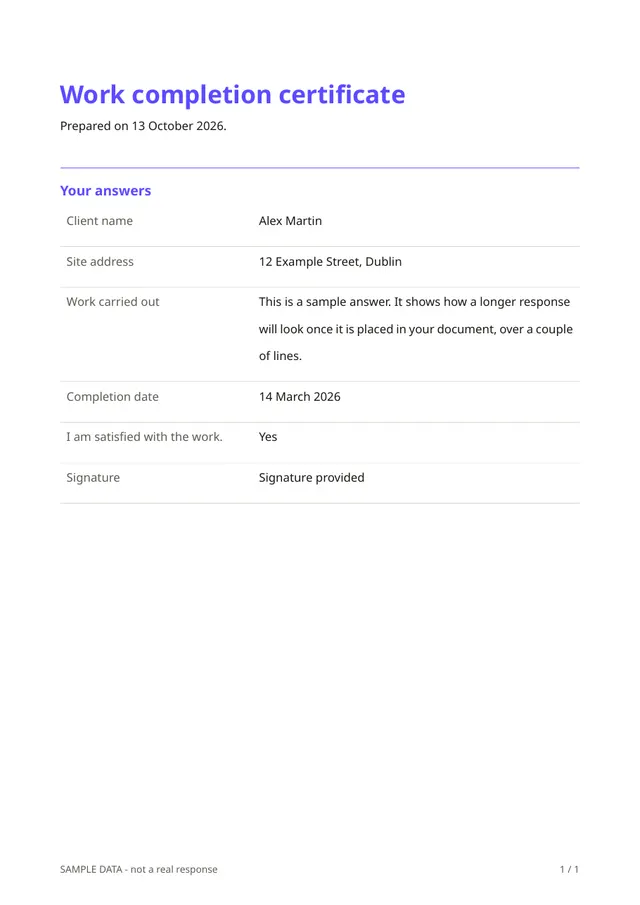
In Fillfold, the work completion certificate template is a good starting point. Out of the box, it asks for:
- the client's name and the site address;
- the work carried out, as a free description;
- the hours worked and the materials used;
- a photo of the finished work (PNG or JPEG);
- the completion date;
- "I am satisfied with the work.", answered yes or no;
- the remaining points, which only appear if the client answers no;
- the client's signature, drawn on the screen.
That already covers most of the checklist above. To fit it to your trade, you can change or add a few questions:
- A Date and two Time questions, if you bill from arrival and departure times rather than total hours.
- A Line items question, if you charge for materials. Each row has a description, a quantity and a unit price, and the line total is worked out for you. A Calculation can then add up the lines. See calculations and totals.
- More photos. In the photo question, tick Allow several files to accept up to ten pictures, for example before and after.
- A Short text for the job number and another for the technician's name.
The full list of question types is in question types. Then design the PDF once: add your logo and a From and to block that prints your business details. See design the PDF. Every job sheet then comes out the same.
How it goes on the day
- Open the form link on your phone when you arrive, or at the end of the job.
- Fill in the client, the site and the work carried out. Add the materials and take the photos.
- Hand the phone to the client. They check what you wrote, answer whether they are satisfied, list anything left to do, and sign with a finger.
- Send the form. The PDF can be opened and saved straight away, and a copy of the response and its PDF is kept in your account.
The client does not need an account or an app. If you prefer, you can also send the link to the client to complete afterwards. See publish and share.
Paper, Word or phone: a quick comparison
| Paper or Word | Excel | Form on a phone | |
|---|---|---|---|
| Setup | Minutes | Minutes, plus formulas | Once, from a template |
| Materials totals | By hand | Formulas | Worked out per line, with a Line items question |
| Photos | Separate | Separate | Inside the PDF |
| Signature | On paper | Printed copy | Drawn on the phone |
| Copy for the client | Carbon copy or scan | Printed or emailed | PDF at the end of the form |
| Same layout for every technician | If everyone uses the same file | If everyone uses the same file | Yes, one published form |
Tips for job sheets clients actually sign
- Write the work carried out in the client's language, not part numbers alone.
- Record remaining points honestly. A clear "return visit needed for the radiator valve" prevents an argument later.
- Take a photo before you start as well as after you finish.
- Get the signature before you leave, while the client can still look at the work.
- Keep the job sheet with the invoice so the two always tell the same story.
A signed job sheet is a record of what was agreed on the day. It does not replace your contract, and its legal weight depends on where you work. The wording you put in the form is yours, and so is the responsibility for it.
Start from the work completion template
The work completion certificate already asks for the work carried out, the hours, the materials, a photo, the client's yes or no and a signature. Add your logo and anything specific to your trade, publish it, and your next job sheet can be signed on site. When it is time to bill, the invoice with totals template takes over.
The template for this
Work completion certificate
Ready to use: change the questions, add your logo and share the link.
Questions
- What is the difference between a job sheet and an invoice?
- A job sheet records what was done on a visit. An invoice asks for payment. Many trades fill in the job sheet on site and send the invoice afterwards, using the job sheet as the basis.
- Is a job sheet template in Word or Excel good enough?
- Yes, if you print it and have it signed, or if you work alone and keep good files. The weak points are retyping, missing photos and signatures that only exist on paper.
- Does a signed job sheet mean the client cannot complain later?
- Not necessarily. A signature shows what the client confirmed on the day. What it means legally depends on your contract and the law where you work, so ask a professional if a lot is at stake.
- Can the client sign on my phone?
- Yes. With a form-based job sheet, you fill in the job on your phone, then hand it to the client, who draws their signature with a finger before the form is sent.
Related templates
- Inspection reportA checklist to record the result of an on-site inspection.
- Invoice with totalsAn invoice with lines, an optional discount, VAT and the total due.
- Repair or service requestDescribe a problem, upload a photo and book a visit.
All guides
- PDF form builder: how to create a fillable PDF or an online form that produces one
- Quote form template: the quote you send, and the request form your clients fill in
- Google Form to PDF: what Google Forms and Microsoft Forms can do, and how to get one PDF per response
Send your first document today.
Pick a template, add your logo, share the link. Free during early access.