Quote form template: the quote you send, and the request form your clients fill in
Updated 21 October 2026 · 7 min read
A quote form template can mean two things: the quote itself, with lines, VAT and a total, or a request for quote form that clients fill in so you can price the job. Most businesses need both: the request gathers the details, the quote answers with a price.
People who search for a quote form template are usually after one of two documents. The first is the quote itself: the page you send a client with the work, the prices, the VAT and the total. The second is a request for quote form: the questions a client answers so that you can price the job. They work best as a pair. This guide covers what goes in each, how to build them in Word or Excel, and how to run both as online forms.
Two forms, one conversation
| Request for quote form | Quote | |
|---|---|---|
| Who fills it in | The client | You |
| When | Before you price the job | Once you know enough to price it |
| What it holds | Contact details, what they need, budget, deadline, photos | Your details, the client, lines of work, VAT, total, validity, terms |
| What you get | Enough information to work out a price | A document the client can accept |
If clients often send vague messages ("how much for a bathroom?"), the request form saves a round of emails. If you already know what they want, go straight to the quote.
What a quote should contain
Use this as a checklist for your quote template.
| Section | What to include |
|---|---|
| Your business | Name, address, phone, email, VAT number if you have one |
| Client | Name, address, email |
| Reference | A quote number you can find again, and the date |
| Validity | "Valid until" a date, so an old price is not held against you |
| Lines | One line per item of work: description, quantity, unit price, line total |
| Totals | Subtotal, VAT rate, VAT amount, total to pay |
| Terms | Deposit, payment terms, what is not included, start date |
Getting the VAT right
The VAT rate depends on the country and on the work. GOV.UK lists a standard rate of 20% for most goods and services in the UK, with a reduced rate of 5% and a zero rate for some of them. Revenue lists a standard rate of 23% in Ireland, with reduced rates of 13.5% and 9%. Check which rate applies to what you sell. If you are not VAT registered, show no VAT. When in doubt, ask your accountant.
What a request for quote form should ask
A request for quote form template works when it asks only what changes the price.
- Contact details: name, email, phone.
- The service: a short list of what you offer, plus "Other".
- The details: a free box, with a hint such as "the more detail, the more accurate the quote".
- Where: the address of the job, if you travel.
- Photos: a picture of the room, the fault or the item often replaces a site visit.
- Budget and deadline: so you know at once whether the job fits.
Leave out anything you can ask later. Every extra required question loses a few people.
A quote template in Word or Excel
The classic way is a Word document with a table, or an Excel sheet. In Excel, put description, quantity and unit price in columns, add a formula for each line total, a sum for the subtotal, a cell for the VAT rate and a formula for the VAT. In Word, a table works for the lines, but you add up the totals yourself or paste them from a spreadsheet. Save as PDF and send it.
This works well for a few quotes a month. The weak points are the ones you would expect: retyping the client's details from their email, a formula overwritten by mistake, and files called "quote final v3". The job sheet guide covers the same trade-offs for site paperwork.
Running both as online forms
In Fillfold, each of the two documents is a form you set up once. Each set of answers produces its own PDF.
The request for quote form
The quote request template asks for:
- the client's full name, email address and phone number;
- "What do you need?", with Design, Development, Consulting and Other as choices;
- "Tell us more", with the hint about detail;
- a budget and an ideal deadline.
Change the choices to your own services. For trade work, add an Address question for the job and an Image upload question: tick Allow several files to accept up to ten photos. Publish it, put the link on your website or in your email signature, or embed it on a page. Each request arrives in your account with its PDF.
The quote itself
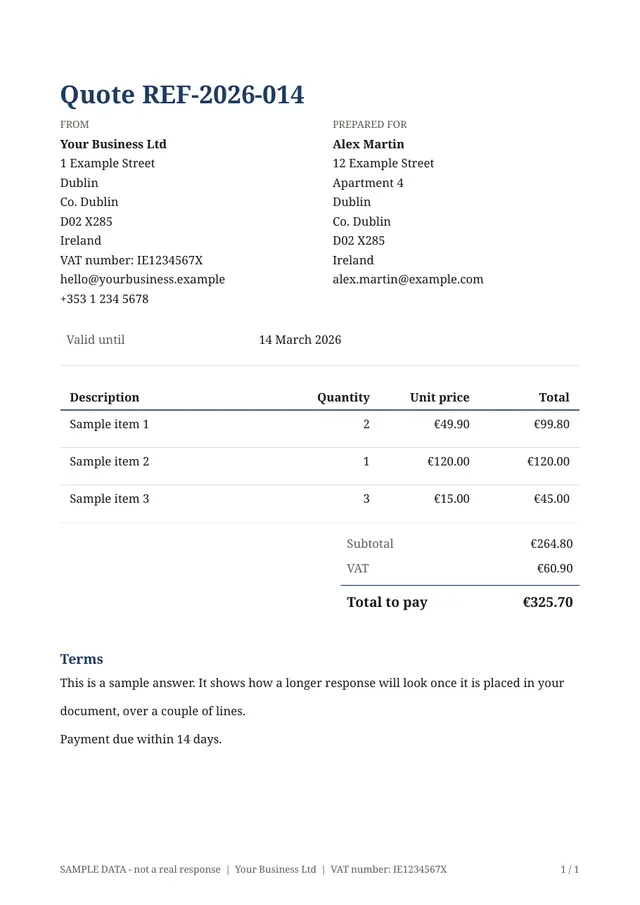
The quote with totals template is the quote. You fill it in yourself, on a phone during the visit or on a computer back at the office. It asks for:
- the client's name, email and address;
- a quote reference and a "Valid until" date;
- the lines, each with a description, a quantity and a unit price. The line total is worked out as quantity times unit price;
- the VAT rate, with a hint giving 20 for the UK and 23 for Ireland, and 0 if you charge no VAT;
- notes and terms.
The subtotal, the VAT and the total to pay are worked out as you type. The PDF is laid out as a quote: your details and the client's side by side, the validity date, the table of lines with subtotal, VAT rate, VAT and total underneath, then your terms. Enter your business details once and they print on every quote. See calculations and totals for how the totals work, and design the PDF to add your logo and colours.
The template starts in euros. To quote in pounds, open the Line items question and each Calculation, and pick GBP under Currency.
How the two fit together
- A client fills in your request form and adds photos.
- You open the request in your account and read it.
- You open your quote form, copy the client's details, and add the lines.
- You submit the form. An Open your PDF link appears straight away: save the PDF and send it to the client.
The PDF is not emailed by Fillfold. You keep a copy of every quote in your account, under Responses. See responses, PDF and CSV.
Tips for quotes that get accepted
- Describe each line in the client's words: "Supply and fit 12 m of skirting board" beats a product code.
- Say what is not included, such as making good, waste removal or parking.
- Put a validity date on every quote, especially when material prices move.
- Send it quickly. A quote sent the same day often wins over a cheaper one sent next week.
- Follow up once, a few days later, with the quote reference.
- Turn the accepted quote into an invoice with the same lines. The invoice with totals template uses the same table.
Start from the templates
Open the quote with totals template, add your logo and your usual terms, and your next quote is a few minutes away. If you also want clients to describe the job first, pair it with the quote request form. Other ready-made forms for pricing and billing are in quotes and invoices.
The template for this
Quote with totals
Ready to use: change the questions, add your logo and share the link.
Questions
- What is the difference between a quote and a request for quote form?
- A request for quote form is filled in by the client: it tells you what they need. The quote is your answer: the lines of work, their prices, VAT and the total.
- Which VAT rate goes on a quote?
- The rate you charge on that work. The standard rate is 20% in the UK, according to GOV.UK, and 23% in Ireland, according to Revenue. Some goods and services have lower rates. If you are not VAT registered, enter 0.
- Is a quote binding once the client accepts it?
- It depends on your wording and the law where you work. A validity date and clear terms help both sides. For anything with a lot at stake, ask a professional.
- Can I show prices in pounds instead of euros?
- Yes. The quote template starts in euros, but the Line items question and each Calculation have a Currency setting with EUR, GBP, CHF and USD.
Related templates
- Quote requestContact details, what the client needs, budget and deadline.
- Invoice with totalsAn invoice with lines, an optional discount, VAT and the total due.
- Work completion certificateThe client signs off that the work was completed.
Sources
Facts checked on 21 October 2026.
All guides
- PDF form builder: how to create a fillable PDF or an online form that produces one
- Job sheet template: what to include, and how to get it signed on site
- Google Form to PDF: what Google Forms and Microsoft Forms can do, and how to get one PDF per response
Send your first document today.
Pick a template, add your logo, share the link. Free during early access.